Showing posts with label #network. Show all posts

Monday, September 14, 2015

How to get more customers to your online store

How to improve sales to your online shop
If you have a small business selling products or services online, a website alone isn't enough. How do you promote it? How can you ensure you appear in search results? Here we offer our top tips on making sure you're not missing out on customers. See also: How to set up an eshop

How to improve sales from your online store: Remember people and search engines

Creating a functioning eShop doesn't mean that the job is done and dusted. A lot more sales can be won by making sure you are truly match-fit for consumer expectations.
First, check that you have all the domains that you need to capture your audience. As always, aim for a catchy name, easy to remember and pass on verbally. For longer names, use hyphens to improve readability.  Website visitors often misspell words, switch or miss letters. Check how your domain name could be misspelled and consider securing these as additional domains.
The more keywords referenced in your domain name, the more search engines will rate your website and position it higher in results, meaning more visitors.For example, a company with the domain BritishPetToys.com could also register BritishPetToy.com, or BritishPetToys.net, and direct traffic from those to its main URL.
Of course, always ensure you are using a trusted web host to maximise uptime and website speed, and a reputable payment processor to keep all your customer payment data secure. A high-quality eShop provider will also deliver you all the certifications that customers look for when choosing a safe online retailer.  SSL is mandatory when handling customer data and keep your shop updated with tools for enhancing security. In retailing, trust means everything so always support your customers with a brisk and solid user experience. That's how Amazon does it, and so should you.

How to improve sales from your online store: Be efficient with social media

Over a billion people use social networks like Facebook and LinkedIn, as well as Amazon and ebay. Connecting your website to your company’s social media is great way to bolster your online engagement. People expect it these days.
As your business becomes increasingly social online, you may realise that your customers are responding more positively to pictures and videos posted on YouTube or Pinterest rather than reams of text.  According to traffic analysis firm Chartbeat, most visitors only read about 50 percent of any piece of content they click on. Conversely, most will view all content delivered via videos and pictures. As a small online retailer, you need to take advantage of multimedia.
How to improve online sales
There is real business value in social media when it can be done in an automated and time-efficient manner. Today there are website packages aimed specifically at not only helping smaller shops launch a website in minutes, but also provide functionality for social media management. Time pressure often means that entrepreneurs have little time to establish and execute a social media strategy to meet modern consumer demands. Now there are tools within eShop packages that greatly simplify social media activities, with rapid creation of social material and the centralised and synchronised management of multiple channels.

How to improve sales from your online store: Remember your listings

Being visible where consumers are searching is of paramount importance.  There are now easy and affordable turn-key tools for ensuring that your website is always within eyesight in your local area. A new ListLocal tool from 1&1, for example, offers a better chance to be easily and quickly found in online directories, search engines, apps and map services.
Listing tools automatically add and constantly update your important company details so they appear on - for example - Google Maps, Thomson Local, Facebook, Foursquare, Yelp, TomTom, Scoot and newspaper directories such as Mirror Online and Independent Online. If you're not in these directories or sites, chances are customers won't know you exist.

How to improve sales from your online store: Optimise your eShop design

There is no second chance for a first impression.  Don’t ignore basic layout rules, and if in doubt, keep things minimal.  Does your design create trust, provide a user-friendly buying experience, set the scene for products, allow brand recognition, suggest reassuring speed and modernity? If you can answer no to any or all of those, you need to change your website.
How to improve online sales
The categories of your eShop are like the aisles in a supermarket.  Make it easy to find products and do not set a maze of endless pages for customers to have to navigate.  The search functionality of your store is critical.  Ensure your search box works and promotes the latest, best products for your customer needs today.  Always ensure you are cross-selling.  Sell more by listing alternatives for items and accessories for your products.

How to improve sales from your online store: Think carefully about mobile

According to the IMRG-Capgemini eRetail Sales Index, UK shoppers spent £91bn online in 2013 and the internet retailing market grew by 16 percent over the course of that year.  If you want to make more money online, think about your overall checkout flow to ensure you are making the experience quick, simple and safe for customers.
Now, mobile compatibility is key and you need to think about how to the large and growing mobile segment. New research from BrightEdge found that on average, 27 percent of websites were misconfigured for smartphone usage, which resulted in an average 68 percent loss of smartphone traffic to those websites. Again, people expect to be able to browse and buy using their smartphones these days. If your site doesn't work properly or at all on all popular smartphone web browsers, you are certainly missing out.
Responsive design means your website works on any size screen and also means faster loading times. People shopping on their mobile have been proven to be less patient compared to those using traditional devices, resulting in a 7 percent loss in conversion for every one second delay in website load time, according to research firm Aberdeen Group Inc.
You may have noticed that some retailers with mobile sites have often slimmed-down features and functions in the hope of speeding up load times.  However, be careful – some elements can be critical for consumers in making their purchasing decision. Dynamically ‘responsive design’ allows for the creation of a more robust mobile-compatible site delivering all the information needed whilst still minding the size and screen limitations. This smart coding can be the difference between a sale or a missed opportunity – so make sure your eShop package optimises your store for mobile.

How to improve sales from your online store: Leverage marketplaces and strong brands

Customers always seek convenience and meeting them closer toward their existing shopping outlets or habits is key. Being present on sites such as ebay and Amazon will not only increase sales channels, but also offer you context, and leverage the trust that these outlets enjoy with consumers. Do not try to compete with the largest retailers on choice, but promote your value-ads – what you do best or differently, such as a personalised solution or unique portfolio of offers.  The more marketplaces you are visible in, the more access you will have to online communities and the more likely your eShop will be to be referred online between shoppers.

How to improve sales from your online store: Optimise your shipping and logistics

The more shipping and payment methods you can offer the more likely customers are to order.  Do excite you customers with on-time and fast delivery, and choose partners with transparent shipping costs.  Utilise tracking and labelling to keep customers informed about their shipping status.  Offering free shipping will always be a powerful driver for conversion – making you between 10-20% more likely to clinch an order.
 How to improve online sales

How to improve sales from your online store: Cater for offline payments too

As well as great design and mobile optimisation, the latest in eShop packages now include lots of options for online payments, be it PayPal or online credit card clearing.  However, consumers now expect total choice in how they can pay – any restriction will lower conversions and could hit your reputation.  As we jump into the Holiday Season, retailers need to be able to capture every sale – on the high street, in pop-up shops, at trade shows – and so offline payments can also be key.
Solutions like PayPal Here give smaller merchants the ability to digitally accept debit and credit cards and PayPal payments, log cash and cheque payments, and send invoices.  PayPal’s new, palm-sized chip and PIN device is paired with a merchant’s existing smartphone or tablet via Bluetooth.  The device, which will take PayPal, Visa, and MasterCard credit and debit cards, is set to become very popular with UK retailers, where PayPal already has 18 million active accounts.
By thinking about your steps toward each of these elements, you will be better placed to expand and optimise your online strategy for 2015.  Always view your technology in terms of supporting these areas, and whilst experimentation and testing will always be necessary, do ensure that there is a clear business case for any new technology or functionality that modifies the overall shopping experience you provide.  The customer is always king – whether they want to shop online or offline.
Read more »

How to track Santa

how to track santa
Each Christmas Santa still amazes us all with his global fulfilment service capabilities. Although rumours of a hostile takeover by Amazon persist, we think Father Christmas has enough public support to survive, and of course no one wants to get on his naughty list. In the current spirit of invasive digital surveillance it's more easy than you might think to track Santa's world tour, so we've put together a guide to keep an eye on the Christmas caravan from your PC, tablet, or smartphone.

How to track Santa: Using NORAD (North American Aerospace Defence Command)

To those of a certain age NORAD will conjure up images of a fresh faced Matthew Broderick and Ally Sheedy bringing the world to the edge of world war three just so they can play the latest video game. In the 1983 classic War Games, the final scenes of potential global disaster are played out in the mountain stronghold of NORAD, where generals track any nuclear missile attacks from aggressive nations (well, back then it was the Soviet Union). Today, at least online, NORAD has turned its considerable monitoring abilities to geo-locating Father Christmas, who presumably must reach some incredible, missile-like, speeds while traversing the skies. That, or they see him as a threat to national security. After all, he does still predominantly wear red.
how to track santa
Actually the NORAD Tracks Santa site is a glorious celebration of Father Christmas and just a fun place for kids (and adults) to waste a little time. While the primary function appears to be watching the Santa express blaze its trail across the skies, as that all happens at night (when most of us are asleep) the builders of the site have opted to include a few other distractions. These include a collection of Christmas themed songs played by the USA Air Force Band, a library that contains various traditions surrounding Father Christmas, and even a games section that unlocks a new attraction each day. We're not entirely sure what controlling a performing Dolphin in the sun drenched plains of Las Vegas has to do with Christmas, but we scored maximum points for jumping through two hoops while hitting a number of balloons with our dorsal flipper, so you won't find us complaining.
how to track santa
The tradition of NORAD tracking Santa's flight began back in 1955 when a misprint in an advertisement ended up with children calling NORAD (or rather it predecessor CONAD) by accident to ask where Santa was. Colonel Harry Shoup, showing a considerable good grace, had his staff check to see where the sleigh currently was, and another Christmas legend was born.

How to track Santa: Using Google's Santa Tracker

The cynical among us will be quick to point out that Google knows pretty much everything about everything these days. Well, why not use that knowledge to spread a little happiness this festive season? On the Google Santa Tracker site the search giant has put together a different Father Christmas related activity for each day in December.
 how to track santa
The choices on offer range from creating jolly e-cards in which you can choose from Santa or his elf back-room staff, and place them in variety of exotic settings, to a service that creates personalised audio messages from St Nick just by asking you a few, well quite a few, questions. Everything can be emailed to you friends and family, while you all wait for the night itself. Then you can enjoy a mince pie while Google shows you how exactly the great red one does get to all the good boys and girls in the world with such a small fleet.
how to track santa

How to track Santa: Using Santa Update

If you prefer a more journalistic approach to the sleigh preparations and social conditions in Santa's toy workshop, then Santa Update is the place for you. This site covers the news that somehow gets missed by the wider media outlets, including radio interviews with well informed elves speculating about a strange, large building with no name in which Mr Christmas is storing something mysterious.
how to track santa
Santa update has also broken several stories regarding sleigh flight testing in Malaysia, speed trials through Russian airspace, and random sightings over Japan where St Nick is thought to be conducting reconnaissance missions. Any disgruntled elves out there that wish to blow the whistle on any Santa scandals can also send their reports directly to the site for publication.The real highlight though is the live radio broadcast set to take place during the big night, which Santa insiders have revealed is being called 'Operation Merry Christmas' by big beard himself.
 how to track santa
 Of course if you prefer to do your own research, then there are email addresses on the site for you to contact St Nick directly and ask him his true intentions. While you're there can you put in a good word for us too? We have been really, really good this year, and would love a Microsoft Surface Pro 3.
Read more »

How to access blocked torrent sites:

The Pirate Bay is back online. Here's how to access The Pirate Bay
The Pirate Bay is back online after it was knocked offline as the result of a massive police raid. In its two-month break it is reported that key staff have left to set up a rival site, however. You should also note that there are growing suspicions that The Pirate Bay is back online as an 'FBI Honeypot' in an effort to catch out those who use it. 
How to use a VPN to access blocked torrent sites such as The Pirate Bay. How to access The Pirate Bay in the UK. How to use a torrent site. (See also: Why you need a VPN: here's what a VPN can do for your online security.)
Well this is awkward. Here at PC Advisor we genuinely don't advocate the use of torrent sites to download and share copyright content. In fact, as the owner and producer of digital magazines  that are regularly ripped off and shared via such sites, we actively disagree with such activity. But we also believe in the freedom of the internet, we're here to provide independent and objective information and, well, you're grown ups. You can make your own decisions as to the legality and morality of your actions, as well as the inherent security risks. And there are legitimate uses of torrent sites anyway.
So here's how to access torrent sites in the UK, even now that your ISP has in all likelihood blocked you from doing so.

How to use a torrent site in the UK. How to access The Pirate Bay in the UK

The principle is simple: you need to create a virtual private network. A VPN enables a computer to send and receive data across shared or public networks like the internet as if it were directly connected to a private network. You get the functionality, security and management policies of a private network via a virtual point-to-point connection. Most importantly in this case, a VPN creates a virtual tunnel between you and the sites and services you need to access, which means the ISP doesn't know who or indeed where you are, so you won't be blocked off from sites you wish to access.
Opera Turbo

Access blocked The Pirate Bay - access torrent sites: with Opera

The simplest way of doing this is to use Opera's Turbo mode. This is intended to speed up your browsing, but it does so by re-routing all your web pages through Oper's own speedy servers. In effect this creates a VPN. We've heard that it helps bypass the ISP blocking for some torrent sites.
Simply install the Opera web browser from PC Advisor. Find the Opera Turbo icon on the lower left of the screen, on the left side of the status bar. Hover this icon, and it says "Opera Turbo Off". Click on it, and Opera Turbo is enabled. The icon turns blue, and each time a page is loaded, information is displayed about the network savings.

Access blocked The Pirate Bay - access torrent sites: with PirateBrowser

Another simple way of using a VPN is to install the PirateBrowser from The Pirate Bay. It's just a modified version of Firefox, and it works in a similar way to Opera Turbo. Just be careful from where you download PirateBrowser.

Access blocked The Pirate Bay - access torrent sites: use a VPN service

Finally, if these options don't work you need to take the marginally more complicated approach of using a VPN service. We explain how to do so in this article: How to use a VPN service to surf the web anonymously.
Read more »

How to keep your email private on Mac

I explained the basics of public-key (PK) cryptography, a way to scramble messages in a way that only someone possessing a particular key can decrypt, without that key ever having to be publicly disclosed or shared. It's an effective system that has no known theoretical exploits, and currently deployed implementations are considered robust.
And to recap: The clever bit with the public-key approach is that you have two complementary keys, one public and one private. The public key can be freely distributed. Anything encrypted by someone else with the public key can only be decrypted by having access to the corresponding private key. And a private key can be used to "sign" a string of text or a document to prove mathematically that only the private key's possessor could have signed it.
But there are two missing pieces that would let Mac, iOS, and other platforms' users take advantage of PK. The first is pragmatic: Senders and recipients need compatible software tools or plugins, preferably integrated into apps so that little effort is required. The second is existential: Without pre-arrangement, such as meeting in person or a phone call, how do you know that what purports to be someone's public key is actually that person's key?
The easiest way to solve both problems is to use an end-to-end proprietary ecosystem, but that gets us back, more or less, to iMessage or something similar. Silent Circle has one of the best options that embeds public-key cryptography, if you can convince all the people with whom you need to communicate to opt in. It starts at $10 per month for unlimited text, calls, video chat, and file transfers among its users. The service's messaging and calling options received scores of 7 out of 7 in the Electronic Frontier Foundation's secure messaging scorecard.
PGP on the Mac
But most of us don't live in a walled garden, and one of the company's founders, Phil Zimmermann, is responsible nearly 25 years ago for turning public-key cryptography into what he called PGP, for Pretty Good Privacy. (How PGP works is described in Part 1.)
PGP is available for the Mac via GPGTools, a version of the free software GPG (GNU Privacy Guard). It lets you build a directory of other people's public keys, while also letting you carry out encryption, decryption, signing, and verifying. (PGP is a trademark, and GPG coined to get around it, but you'll often see PGP used generically to refer to this method of using public keys.)
The EFF has very nice step-by-step instructions for installing GPGTools to allow it to be used directly with either Apple Mail or Mozilla Thunderbird for email; the tools are also available via the application Services menu wherever you can manipulate or select text. GPGTools is currently free, but plans to charge a very modest fee for its email plug-in at some point to help support development costs.
The EFF instructions walk you through creating your own public/private key in GPG Keychain. To use GPGTools with email, your key needs to have the same email address as the return address from which you want to send encrypted messages. Once you have a key, you can upload a key to a keyserver by selecting your key and choosing Key > Send Public Key to Keyserver. This makes your key searchable by your name and email address in a PGP directory. A key has an associated fingerprint, a cryptographic transformation of the public key that's far shorter, which I'll get to in a moment.
When you compose an email in Mail after going through the installation and key creation, you now have two new icons on the Subject line as long as the sending account matches any public key you've created. The blue starburst checkmark indicates your outgoing mail will be signed by your private key, allowing others to validate that it's been unchanged in transmission as long as they have your public key. And you can click the lock icon if all of the recipients in the address fields have public keys stored in GPG Keychain.
(Note that PGP-encrypted email protects the contents of the message, but not its subject line nor the metadata: the routing information and other details stored in email headers, and which have formed a large portion of the analysis by the NSA and other governments' security agencies to identify patterns.)
On sending such a message, you're prompted for your passphrase. I store my passphrase in 1Password, so I can bring it up rapidly. If you plan to type it, make it something long and memorable with a single piece of punctuation, like "From the still of the ! night" -- this is essentially uncrackable due to length and the fact that the phrase would never appear in any English text used for word-frequency analysis.
Now, of course, your recipients have to go through the same procedure, or use other compatible PGP software. Symantec still makes PGP, although it works on the Mac only with Microsoft Outlook. There are other implementations of GPG for other platforms. And some mobile apps can handle PGP-encrypted documents and email. (I looked for PGP iOS app that meet the bill, and the current lineup have a variety of limitations. I'll be looking into this further as this situation changes.)
With GPGTools installed, you can also perform all the other PGP-style operations from the Services menu. For instance, as I compose this in BBEdit, I can select BBEdit > Services > Insert My Fingerprint (which is 53F4 9E97 2652 4E2F 2993 4611 BB54 A24B EDD1 8384). I can also encrypt, sign, verify, and so forth.
Checking on the keys
But let's turn to the existential problem. You have a key that's associated with your email address, and you post the public key to a keyserver. How can someone be sure it's your key? If they email you at the address, it's possible your email has been tampered with, and the message is intercepted, and responded to without you ever knowing about it. One method of validating a key is to call someone, because there's about zero probability that a man-in-the-middle could know you were making the call, intercept it, and speak in real time the fingerprint of a false key. Once you've verified a key by voice or in person using its fingerprint, you're set.
The reason I'm so sure, though, that public-key messaging might rise in popularity, though, is due to Keybase.io, currently an invitation-only and free public-key service that manages keys and handles encryption tasks in the browser or via command-line tools -- but which also provides substantive and useful ways to validate your public key to other people's satisfaction.
Visit my profile on Keybase.io, and you see that I've verified myself in several ways. I posted a tweet with a code provided by Keybase, posted an item to my Github repository, added a special text-only DNS record, and uploaded a file to my web site. This is probably a good set of vectors that no other person should be able to hijack without being noticed.
The nice part of Keybase is that as it expands outside of its invitation-only phase, it will provide a common place for people to upload keys or generate new ones, and validate themselves all at once. Although Keybase doesn't operate keyserver software (for a variety of reasons, obscure and otherwise), you can click on the key of anyone's profile, and up pops a window from which you can save that person's public key or copy it.
GPG Keychain lets you paste a public key into the main window or import the public key file. Then you can immediately confirm that key against the fingerprint on the site in the same pop-up window.
None of this is, shall we say, straightforward. But neither does it require the level of tweakiness and complexity of years past. Once set up, you can send and receive encrypted emails with other people who use PGP simply by remembering or retrieving your key's passphrase. And that takes us a lot closer to reliably encrypted communications on demand than we have been until now.
Read more »

How to watch ICC Cricket World Cup online

ICC Cricket World Cup
Where to watch the Cricket World Cup online, and how to listen to the Cricket World Cup online. Plus: the 2015 Cricket World Cup schedule, and who is broadcasting in each country. (See also: How to stream from PC to TV.) The Cricket World Cup has begun: here's how to watch it wherever you are.
'Thwack!' That is the oh-so English sound of leather on willow. This year transported down under for the ICC Cricket World Cup, set to take place between 14 February and 29 March in the wilds of Australia and New Zealand. It promises to be a feast of 50-over cricket.
The Cricket World Cup will feature 14 nations ranging from the giants of India, Australia, England and South Africa, through fancied outsiders such as New Zealand, Pakistan and Sri Lanka, less fancied dark horses such as the West Indies and Bangladesh, and the qualifying associate nations: in this case Zimbabwe, Scotland, Ireland, Afghanistan and UAE. This form of the game always brings shocks, often produces drama, and allows for great innings and bowling performances.
Appetite whetted, you probably want to know where you can watch this feast of bat vs ball. In this article we explain how to watch ICC Cricket World Cup online, as well as how to listen to Cricket World Cup 2015 commentary online. We'll also show you the full ICC Cricket World Cup 2015 schedule so you can pick and choose your watching pleasure. (See also: How to delete cookies and web browsing history.)

How to watch ICC Cricket World Cup online in the UK

Sky Sports has exclusive rights to show the live action from the ICC Cricket World Cup 2015, throughout the UK. And ITV has the highlights package.
For those not preparted to pay for Sky, ITV will show highlights of all of England’s games, as well as the semi-final and final, on the main ITV1 channel. Highlights of other games, including those of Scotland and Ireland, will be shown on sister channel ITV4. To watch ITV online simply head to ITV.com, or install the ITV Player app on your Android or iOS smartphone or tablet. All this content is free.
Live coverage of the tournament will be broadcast only on Sky Sports. As is now familiar, the broadcaster is rebranding its Sky Sports 2 channel as 'Sky Sports World Cup' for the duration.
There are two ways to watch Sky's coverage online. If you’re already a Sky customer and your package includes the sports channels, then you can use Sky Go to watch live coverage of ICC Cricket World Cup. The Sky Go app is available on various devices, including Android phones, iPhones and iPads. You can also sign into Sky Go via a web browser at Sky.com.
If you’re not a Sky customer but you want to watch key games online, fear not. You can get Sky Sports coverage with Now TV which is also available on a large range of devices or simply a web browser. You’ll need to buy a Sky Sports Day pass for £6.99 on the day you wish to watch Sky Sports. Again, head over to Sky.com for details and to sign up. Sky offers its own pretty comprehensive guide to watching the Cricket World Cup online, here.

How to watch ICC Cricket World Cup throughout the world

Do you live outside of the UK? The rights for the ICC Cricket World Cup 2015 have been sold as follows. Each of these broadcasters has its own online viewing portal:
Afghanistan: Ariana Television Network: Lemar TV
Australia: Nine Network, Fox Sports
Africa: South African Broadcasting Corporation
Bangladesh: Bangladesh Television
Canada: Asian Television Network
China: Star Sports
Europe (Except UK & Ireland): Starsports.com
Fiji: Fiji TV
India: Star Sports 1 Star Sports 3 (Hindi), DD National (mostly India matches)
Jamaica: Television Jamaica
Middle East: Arab Radio and Television Network
Nepal: Star Sports 1, Star Sports 2
Singapore: Star Cricket
West Indies: Caribbean Media Corporation
(See also: How to use torrent sites in UK: how to access The Pirate Bay, blocked torrents.)

How to listen to Cricket World Cup commentary online

Cricket commentary is available for free, online, via the BBC's Test Match Special service. Test Match Special is available simulataneously online and on digital via BBC Radio 5 Live Sports Extra, and if you live in the dark ages (or you are in the car) on long wave Radio 4.
As well as DAB radio, you can listen to Radio 5 Live Sports Extra online, via the BBC iPlayer Radio app, or via the BBC Sport app. To listen via a web browser just head over to http://www.bbc.co.uk/5livesportsextra/on-air . But if you will be listening regularly to ICC Cricket World Cup commentary we recommend installing the iPlayer Radio app - which is available for iPhone, iPad and Android. (See also: How to watch the International Space Station pass over the UK.)

ICC Cricket World Cup 2015 schedule

Sat 14 February: 03:30 GMT Australia vs England
Sat 14 February: 22:00 GMT Sri Lanka vs New Zealand
Sun 15 February: 01:00 GMT South Africa vs Zimbabwe
Sun 15 February: 03:30 GMT India vs Pakistan
Mon 16 February: 22:00 GMT West Indies vs Ireland
Tue 17 February: 22:00 GMT New Zealand vs Scotland
Wed 18 February: 03:30 GMT Bangladesh vs Afghanistan
Thu 19 February: 22:00 GMT Zimbabwe vs United Arab Emirates
Fri 20 February: 01:00 GMT New Zealand vs England
Sat 21 February: 03:30 GMT Australia vs Bangladesh
Sat 21 February: 22:00 GMT Pakistan vs West Indies
Sun 22 February: 03:30 GMT India vs South Africa
Sun 22 February: 22:00 GMT Sri Lanka vs Afghanistan
Mon 23 February: 22:00 GMT England vs Scotland
Tue 24 February: 03:30 GMT West Indies vs Zimbabwe
Wed 25 February: 03:30 GMT Ireland vs United Arab Emirates
Thu 26 February: 03:30 GMT Sri Lanka vs Bangladesh
Thu 26 February: 22:00 GMT Afghanistan vs Scotland
Fri 27 February: 03:30 GMT South Africa vs West Indies
Sat 28 February: 01:00 GMT New Zealand vs Australia
Sat 28 February: 06:30 GMT India vs United Arab Emirates
Sun 01 March: 03:30 GMT Pakistan vs Zimbabwe
Sun 01 March: 22:00 GMT England vs Sri Lanka
Tue 03 March: 03:30 GMT South Africa vs Ireland
Wed 04 March: 01:00 GMT Pakistan vs United Arab Emirates
Wed 04 March: 06:30 GMT Australia vs Afghanistan
Thu 05 March: 22:00 GMT Bangladesh vs Scotland
Fri 06 March: 06:30 GMT India vs West Indies
Sat 07 March: 01:00 GMT Pakistan vs South Africa
Sat 07 March: 03:30 GMT Zimbabwe vs Ireland
Sun 08 March: 03:30 GMT Australia vs Sri Lanka
Sun 08 March: 22:00 GMT New Zealand vs Afghanistan
Mon 09 March: 03:30 GMT England vs Bangladesh
Tue 10 March: 01:00 GMT India vs Ireland
Wed 11 March: 03:30 GMT Sri Lanka vs Scotland
Thu 12 March: 01:00 GMT South Africa vs United Arab Emirates
Fri 13 March: 01:00 GMT New Zealand vs Bangladesh
Fri 13 March: 03:30 GMT Afghanistan vs England
Sat 14 March: 01:00 GMT India vs Zimbabwe
Sat 14 March: 03:30 GMT Australia vs Scotland
Sun 15 March: 03:30 GMT Pakistan vs Ireland
Sun 15 March: 22:00 GMT West Indies vs United Arab Emirates
Wed 18 March: 03:30 GMT Quarter Final 1 - TBC vs TBC (A1 v B4)
Thu 19 March: 03:30 GMT Quarter Final 2 - TBC vs TBC (A2 v B3)
Fri 20 March: 03:30 GMT Quarter Final 3 - TBC vs TBC (A3 v B2)
Sat 21 March: 01:00 GMT Quarter Final 4 - TBC vs TBC (A4 v B1)
Tue 24 March: 01:00 GMT Semi Final 1 - TBC vs TBC
Thu 26 March: 03:30 GMT Semi Final 2 - TBC vs TBC
Sun 29 March: 03:30 GMT Final - TBC vs TBC
Read more »

How to turn off GPU hardware acceleration in Chrome

If you're having performance issues with Google Chrome, hardware acceleration built into the web browser could be to blame. Here's how to turn off GPU hardware acceleration in Chrome. Also see: What's the best browser for Windows 2015?
Google Chrome supports GPU hardware acceleration, which means it doesn't need to rely solely on the CPU to render web pages. This should be a good thing, and it should speed things up. In many cases it is, but hardware acceleration in Chrome can also cause problems including keyboard and mouse lag, slow performance, scrolling glitches and tabs not loading. If you're experiencing performance issues with the browser, here's how to turn off (or on) GPU hardware acceleration in Chrome. Also see: Google Chrome v40 review.
(Another gripe of ours: How to stop Shockwave Flash crashing in Chome.)

How to turn off hardware acceleration in Chrome 

Step 1. Open Google Chrome and click the three horizontal lines icon to the far right of the address bar. Now choose Settings. 
How to turn off GPU hardware acceleration in Chrome: Fix keyboard and mouse lag, slow performance, scrolling glitches and tabs not loading in Google Chrome
Step 2. At the bottom of the page click on 'Show advanced settings…' 
How to turn off GPU hardware acceleration in Chrome: Fix keyboard and mouse lag, slow performance, scrolling glitches and tabs not loading in Google Chrome
Step 3. Scroll down the page again until you find the System heading, below which is an option to 'Use hardware acceleration when available'. Remove the tick from this box to turn off hardware acceleration (or tick the box to turn it on). 
How to turn off GPU hardware acceleration in Chrome: Fix keyboard and mouse lag, slow performance, scrolling glitches and tabs not loading in Google Chrome
Step 4. Having altered this setting you'll see a link pop up beside the option advising that Chrome requires a restart. Tap restart on this link to restart Chrome with or without hardware acceleration.
How to turn off GPU hardware acceleration in Chrome: Fix keyboard and mouse lag, slow performance, scrolling glitches and tabs not loading in Google Chrome
Step 5. If turning off hardware acceleration in Chrome doesn't fix your problem, you can simply follow the above steps to turn it back on
Read more »

How to stop Ubuntu from sending desktop searches to online retailers

When you install Ubuntu the Unity desktop will send your searches over the web by default, showing you products you can purchase from Amazon and other retailers, including eBay. Oh, you searched for Firefox? Did you mean you wanted to purchase a Mountain Equipment Men's Firefox Jacket from Amazon? No thanks, Ubuntu--I just wanted to launch Firefox.
This is an obnoxious and privacy-concerning feature, and Canonical has been raked over the coals for it by the EFF. They'll finally be dropping it in the next version of Unity, Unity 8. But Unity 8 needs a lot of work and won't arrive on desktops until Ubuntu 16.04 in April 2016--Canonical is more focused on Ubuntu for smartphones in the short term.
There's no need to wait. Here's how to strip the annoying shopping search results out today, be it with a sledgehammer or with a scalpel.
Disable all online search results
There's a graphical option that lets you disable all online search features, but as the name implies, it removes all the online search results--some of which you might want.
This option is available in Ubuntu's System Settings window. Click the gear icon at the top-right corner of your screen and select System Settings to open it. Click the Security & Privacy icon, and click over to the Search tab. Under "When searching in the Dash," set the "Include online search results" slider to "Off." Easy!
If you just want to search your local computer and never see online search results, this option works well. Despite the vague naming, this option also prevents your computer from sending your searches over the Internet. It doesn't just hide the search results.
What if you only want to hide shopping results? Read on.
Want to stay up-to-date on Linux, BSD, Chrome OS, and the rest of the World Beyond Windows? Bookmark the World Beyond Windows column page or follow our RSS feed.
Remove only shopping search results
In Ubuntu 14.04, Unity's Amazon search integration is no longer part of a specific package, so you can't just uninstall the "shopping lens" package anymore. Instead, use the below command to disable the Amazon plug-in and other shopping plug-ins.
You'll need to do this from a terminal window. Open a Terminal by opening the Dash and performing a search for "Terminal." Yes, you'll see advertisements for the movie "The Terminal" on Amazon, but just click the icon that opens the Terminal application on your computer.
Copy and paste the following command into the Terminal window, and then press Enter:
gsettings set com.canonical.Unity.Lenses disabled-scopes "['more_suggestions-amazon.scope', 'more_suggestions-u1ms.scope', 'more_suggestions-populartracks.scope', 'music-musicstore.scope', 'more_suggestions-ebay.scope', 'more_suggestions-ubuntushop.scope', 'more_suggestions-skimlinks.scope']"
That's it! You're done. You don't even have to reboot. And, while you're at it, feel free to right-click the Amazon icon that comes on Unity's launcher and select Unlock from Launcher. This will remove the icon and free up some space.
If you're not a fan of Unity in general, you can just use another desktop environment. Variations of Ubuntu like Kubuntu, Xubuntu, Lubuntu, and others don't use the Unity desktop, and they don't have the shopping search stuff built in. That's just part of the default Unity desktop, not the Ubuntu project as a w
Read more »

secret Chrome app launcher tips and tricks

The Chrome app launcher is more than a glorified version of the Windows start menu. It packs a surprising amount of Google-y power that can speed up a wide variety of tasks on a Chromebook--and Windows, if you install the Chrome launcher.
Use the power of the built-in search button
Remember, Google killed the caps lock key when it designed the Chromebook keyboard. In its place is a dedicated Search button, which actually does a ton of things besides merely searching Google. Though it does that well, you can also use the Search button whenever you want to go to a new site. Instead of manually opening a new tab or typing Control-T, just hit the Search button and start typing.
Your Chromebook will pull up suggestions from your search history, bookmarks, frequently-visited sites, and--of course--Google's auto-suggestions from the Internet and Chrome Web Store. Hit Enter and you'll go to the first result.
After using this method to navigate the web, Windows or OS X will suddenly start to feel slower by comparison... though the Chrome app launcher offers the same functionality on those operating systems. There's no fancy native keyboard shortcut on non-Chromebooks, though.
Get a calculator and unit converter all-in-one
Forget grabbing your smartphone or picking up a calculator for those pesky math calculations. Instead, just hit that Search button on Chromebooks and start typing to get an instant answer. Calculations will show up right in the app launcher box, without the need to wait for a new tab to open.
The keyboard commands are pretty straightforward: Use the forward slash for fractions and division, the x for multiplication, and the period for decimals.
Hit Enter to open a new browser tab with a full-blown calculator, which you can use for performing additional calculations with your answer. You can get the same magic with unit conversions, handy for cooking or measuring something. Unfortunately, the Chrome app launcher doesn't yet handle currency conversions.
Open apps with your voice
Siri and Google Now have made speaking commands to smartphones a routine occurrence. Hit the Search button and say "Ok Google," then speak your command.
 There are also several recognizable voice commands that will perform a function, such as setting a timer, or creating a reminder that will sync to Chrome on any device. Sure, you might feel weird yelling at your computer, but it's sometimes faster to get information using your voice.
Tricks for opening apps
Fancy tricks aside, the Search button always takes you to the seemingly benign app launcher. But there are a few other hidden gems hidden within the app launcher itself.
For example, when you right-click (accomplished by tapping two fingers on the Chromebook trackpad) on an app's icon, you'll find some additional options. You can open a Chrome app in its own window, for instance, which is useful if you want a desktop-type experience by having different apps and web services running discretely.
Right-clicking on an app in the launcher can also help you perform some regular maintenance, such as fully removing the app from Chrome. If you click App Info, you'll get geeky developer stats and can also designate whether you want the app always to open as a regular tab, a pinned tab, in its own window, or maximized.
Sync your app folders
Just like on a smartphone, Chrome's app launcher lets you drag and drop your apps into folders for a tidier approach. Your folders don't carry over to other computers, however--unless you manually enable a Chrome flag that lets you sync your setup across multiple Chromebooks, as well as Windows PCs and Macs that have the Chrome app launcher installed.
To enable this, type chrome://flags in the omnibox. Then, look for the flag labeled enable-sync-app-list. Next time you sign in to a friend's Chromebook or pick up a new one, you won't have to reorganize where your apps live in the launcher.
Read more »

How To Delete Blogger Photos Permanently Or Restore Back

If you've upgraded to Google+, the photos you've uploaded to your blog will be stored on Google+.  Removing the photo from your blog will not remove the photo from your blog's album on Google+. How To Do That :


You can recover photos that were backed up to Google+ and deleted less than 60 days ago. How to get your photos back:


Android App Users :

  1. Open the Photos app .
  2. Touch the menu icon  at the top left and select Trash at the bottom.
  3. Touch & hold the photo you want to recover.
Touch the restore icon  at the top right. This will put the photo back onto your phone, into your Auto Backups, and into any albums it was in.

Desktop Computer :

  1. Open Google+. Place your cursor over the Google+ Home menu near the top left corner.
  2. Select Photos  from the Google+ navigation menu.
  3. Click More and then Trash.
  4. Place your cursor over the photos you want to restore > click the checkboxesto select them.
  5. Click Restore. Your photos will be restored to the same album(s) they were in before they were deleted.

Ios App :

  1. Open the Google+ app .
  2. Touch the menu icon  at the top left > Photos.
  3. Touch the title at the top (it will probably say Highlights) and choose Trash.
  4. Touch the select icon  at the top right.
  5. Select photos and touch Restore at the bottom right. This will put the photo back onto your phone, into your Auto Backups, and into any albums it was in.

Mobile Browser :

You can't restore photos using the mobile web browser at this time, but you can try on a desktop computer.


If you haven't upgraded to Google+, your images will be stored in Picasa Web Albums. Deleting an image from your blog that's stored in Picasa Web Albums will also delete the photo in Picasa, and vice versa.

Picasa Web Albums stores all photos uploaded to Blogger (including custom domains). A few things to know:
  • Each blog that includes photos will have a corresponding Picasa Web album (with the same name) for those photos. The album cover in Picasa Web will be designated with a small orange Blogger icon.
  • Blogger album visibility are automatically set to 'Limited, anyone with the link.'
  • All photos posted to Blogger are included in the 1GB of free storage allotted to Picasa Web Albums.
  • When you delete photos from your Blogger album in Picasa Web Albums, the photo will also be deleted from your blog. Likewise, if you delete a photo from Blogger it will be deleted from Picasa Web Albums.
Read more »

How To Undo Send Email in Gmail 2015

In Our Daily use Email is Very Useful for us. Sometimes after send the Email We know that some mistake are there or some data is missing in email in this matter we again send mail after editing mail.  Now Gmail give a Facility you can undo send email in gmail.


Steps For Undo Email in Gmail :-
1 > First of all Click On the Button Right Top Side in Gmail.
2 > Then Click On The Setting Option.
3 > Now Click On The Labs Option then you see below screen.


4 > Scroll Down the page and Enable The Undo Send Option and Click On Save Changes Button
5 > Then Go to the General Tab (in setting) and you see below Screen


6 > Then Enable the undo send option Now You can undo send Email.


 That's all !!! If you liked this post then please share this post to your friends :)
Read more »

How To Earn money from SEOCLERKS 2015

 
SEOClerks is a marketplace originally designed for SEO services. As part of our continuing effort to expand and innovate, we've changed. Since the inception of SEOClerks, we've expanded beyond SEO offering a Want to Buy and Want to Trade section where users can ask for anything. Our platform is built by community suggestions that our users want and need.
THIS is what the SITE says and yes its one of the best sites on net to get SEO services and also to earn online.


How To Earn From SEOCLERKS :

1. SIgn up at SEOCLERKS from here .

2. Complete your profile by adding a profile pic, status and skills.

3. Then click on SELL A SERVICE under Seller tab.

4. Create a service. Anything you know and you can do related to facebook likes , google plus shares ,SEO, websites, social sites etc etc.

5. After successfully creating a service, share your service on different social networking sites.


6. If your service is cheap and good then you will get orders for it. Always try to make cheap and unique services because there are many same type of services offered by different users.

7. The second way to earn which is more effective for me is by BIDDING on user requests. First of all go to WTB SECTION. There you will see a list of services that user wants. If there is a service that you can provide just open the link and bid on it. You will get response if your bid was good enough to impress the customer.


Some tips which are really neccessary :

1. Dont be in a hurry, it takes time to start. Have some patience
2. Since you are new to the site, try to make services cheap. Once a servie of your's get a boom then you may increase the price.
3. Try to bid on almost all services that you can do and make the cheapest bid.

Read more »

How to Increase Your Google AdSense Earnings 2015


For a little over a month now, I’ve been looking at my AdSense earnings in Google Analytics to better understand my earnings, and I’ve stumbled across some rather interesting results. Without even realising it, I’ve come up with even more ways to increase my AdSense earnings each month. They range from simple ad placement, to writing specific posts, and appealing to a certain referrer. Here’s how you can increase YOUR earnings.
Table of Contents
  • Setting Up
  • Tip #1 – Appeal To Your Top Referrers
  • Tip #2 – Write Content That Links Within Your Site
  • Tip #3 – Text and Image Ads
  • Tip #4 – Increase Ad Size
  • Tip #5 – Ad Placement

Setting Up

The first thing you’ll want to do is set up your AdSense so that you can study it in more detail, in Analytics. To do this, when you’re viewing your report overview, just click the link to integrate Adsense with your Analytics account. It’s just one click and then a small amount of information on your Analytics account. You have to be an admin on your Analytics account, otherwise it won’t let you make the changes necessary, but if you’re the only person running the website, this shouldn’t be a problem. NOTE: Because you’re adding new information, GA will not transfer over details from the past, you will only see new results from when your join the two together.
Now that you’re set up, it’s best to have a run down of what all the terms mean, so that you can understand your results better.
AdSense Revenue is the amount of money you’ve made in your selected time period .
/ 1000 visits, is how much money you’ve made for every 1000 visits to your site.
Ads clicked, is the amount of ads clicked by viewers.
Ads clicked / visit, is the total number of visits, divided by the number of ads clicked.
CTR stands for Click Through Rate and this is the percentage of clicks you get for each ad impression.
eCPM stands for effective Cost Per 1000 impressions (M being a roman numeral). It’s the total earnings per 1000 impressions.
AdSense Ads Viewed is the total number of ads seen, from all multiple ads on all the pageviews.
AdSense Unit Impressions / Visit is the number of ads that are viewed by visitors, per visit.
AdSense Page Impressions is the amount of pages viewed that have AdSense ads on them.
AdSense Page Impressions / Visit is similar to pages viewed per visit, only it’s pages with ads viewed, per visit.

Tip #1 – Appeal To Your Top Referrers

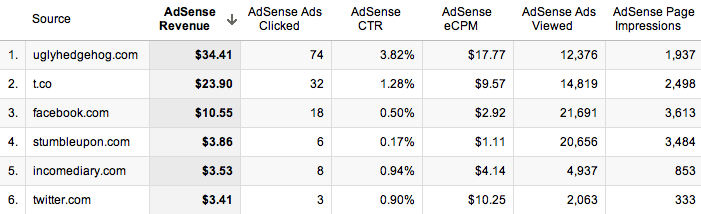
By far, my favourite thing about using Analytics to look at your AdSense, is that you can then find out which of your referrers are worth the most in terms of AdSense revenue.When you go into the new GA, click on Content, then AdSense, then AdSense Referrers, this will bring up a list of all the websites that sent visitors who have clicked on an ad, as well as a timeline of your earnings.  The most important part of the results isn’t the ads clicks, viewed, or even the revenue; it’s the Click Through Rate (CTR) and eCPM (effective Cost Per 1000 impressions).

The CTR is the percentage of ads that are clicked, per impression, so you want that to be as high as possible. The reason the CTR is much higher than some of the other referrers is because of the quality of visitor that I’m receiving from that referrer. StumbleUpon has a particularly poor CTR, because the people who use it aren’t looking for anything in particular so it’s hard to get their attention, which may result in them clicking on an ad.
The eCPM is also substantially higher than the other referrers, which tells me that if I can increase the number of impressions that I’m getting from them, then I will earn a lot more money. The quality of Twitter user is usually pretty poor, as they don’t typically spend too much time on the site (00:01:47), and even though a link a lot to my website  around 10 times a day through Twitter, I still get less traffic from them than Facebook. Facebook on the other hand has a better quality of visitor, with people looking at more pages and staying for longer (00:02:29, but their eCPM is actually lower than that of Twitter.
People are less likely to click on ads when they’ve come from websites such as Facebook, as they’re more interested in the content that you’ve written. They provide a good quality of visitor, but their time on site is almost half that of the forum in my niche, so it’s important to find a good balance of visitor quality. Twitter users seem to behave differently to other users, as they’re in a browsing mode, and are clicking on content that they see in their feed before it disappears. It would appear that they treat the websites they visit in a similar way, by clicking on more ads. I actually get more traffic from Facebook, but my earnings from Twitter far outweigh those of Facebook, which is good really, because it’s much more acceptable to post multiple links on Twitter.

Tip #2 – Write Content That Links Within Your Site

This step produced shockingly good results for my earnings. This meant that anyone who had viewed the page would have to click on another if they wanted to learn anything. This forced them to increase their pages per visit, which produces more ad impressions.
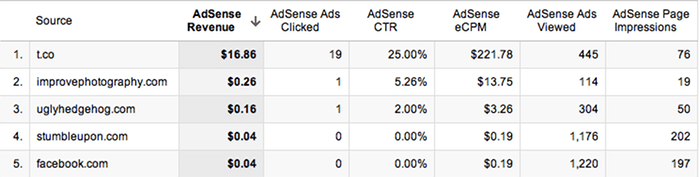
When I break down my earnings so that I’m only receiving information from the 6th of November, I can start to see which referrer is earning me the most money. T.co is the URL shortener that Twitter uses, so I can see clearly that a small number of page impressions has yielded very strong earnings. With a large number of clicks from 76 page impressions, I have an unusually high CTR. From this response, I can see that to earn money, this is the sort of content that I need to be promoting, though as many sources as I can. I’m currently combining this content, with the forum mentioned in the tip above, so that I can drive top quality traffic, to the content that earns me the most money. After just 2 days of doing this, I’m already starting to notice a massive improvement.

Tip #3 – Text and Image Ads

Enabling your ad units to display both text and image/rich media ad types, increases the number of ads competing to appear on your site. More advertisers in the ad auction drives higher bids and more revenue for you. On average, publishers see a 59% increase in eCPM earnings when they make these recommended changes. If you’re not already using both, then it’s as simple as going into the ‘My ads’ tab, and clicking on ‘Edit ad type’, next to the ad in the list. This will increase the cost per click, so even if you’re not improving the number of clicks that your website is getting, you’ll still make more money.

Tip #4 – Increase Ad Size

Advertisers prefer wider ad units for their premium inventory, resulting in higher bids for your ad placements. Though all sites are different, publishers typically see 0.35 eCPMs when using the wider ad size. You can start by simply changing single ads on popular pages to see how well they work, and if it’s not too intrusive, then you can start rolling it out across your whole website. I didn’t do this in my sidebar because I was aware that the whole width of the sidebar would have to change, and that would not only take a lot of time, but mess up the spacing that I had laid out for posts. Instead, I added a wider ad at the end of each post, that differs to all the other ads on my website, and this saw a good improvement in ad sales.

Tip #5 – Ad Placement

Where you choose to place the ad on your site will make a big difference to the amount of clicks that you get, because the more obvious the ad, the more likely someone will be to see it. It’s hard to judge on your own website because we look at our sites differently to how other people view them, so the best way to start seeing results, is to experiment with ad placement. When I first started, I had two ads on my website, one at the top of the sidebar, and one at the bottom. Since then, we’ve added another ad to the side bar, and reloated the bottom one to under the subscribe button, added an ad to the bottom of each post, and put a small text ad just below our header.
The small text ad below our header made the biggest difference to our results because it stands out the most to new visitors, and could even be possibly mistaken for a link within our own website. It’s a very simple ad, and less appealing than a flash one, but it’s much less intrusive, and in a better position. Overall, I don’t like to add too many ads because I don’t want to put off visitors or make my website look bad. I always find it odd when people choose to include an ad block in their header, because that makes me find their website much less appealing.
Read more »

Kik Messenger for Pc 2015

We can install Kik Messenger on PC in two different ways using Bluestacks or Youwave Android emulator. If you don’t know about anything about Android emulator then don’t worry, you don’t need to know anything about Android emulators. Just follow the below written steps within next 10 minutes you can use Kik messenger on your Windows laptop. You can install Whatsapp or BBM messenger in your laptop using the same procedure.
In order to install android emulators your Computer/laptop should have minimum of 2 GB RAM but it will slow your PC a lot( 2 GB is OK but 4 GB is better), at least 1.5 GHz or more processor speed.

Install Kik Messenger On PC – Download Kik for Windows 10/8.1/8/7 Laptop

Complete the installation procedure. Once you’re done with the installation, go to your windows desktop screen there you can see bluestacks software shortcut, open that software. If you do not find shortcut to bluestacks software in desktop then go to windows search and search for bluestacks there, definitely you can see the bluestacks there. After opening the bluestacks it’s just like walk in a park.
  • You will see orange search button at left top corner like in the below screenshot. just search for Kik there.
Search for Kik Messenger
Click on orange button
playstore kik messenger
Click on Search Play for Kik
  • Don’t press enter button click on Search for Kik on Play store. Be careful while performing this step. Just follow the images.
As soon as hit that search Kik on Play Store button you will be taken to Play Store like we always do in our Android Phones. Just click on Install button there. After pressing install button Play Store will ask you to enter your Gmail Credentials, so log in into your Gmail account that’s it. Give it few seconds to download and install the app.

Download Kik For Windows 7 or Windows 8/8.1 PC Free
After successfully installing Kik on Your Windows laptop ( in Bluestacks), go to bluestacks home screen. At top right corner click on All Apps button there you can see all installed applications in bluestacks. There you can find Kik App.
Open Kik Messenger from All Apps
  • Open Kik messenger >> Log in using your credentials. If you don’t have Kik account you can create one using your any one of Email id.
install kik on Windows8
Log in or Register in Kik

 Method-2 > Installing Kik Messenger on PC Using Bluestacks( APK file Method)

After Installing bluestacks, rather than searching for Kik messenger in Bluestacks you can directly download Kik Messenger APK file from Play store. After downloading Kik APK file just open it. That’s it you can see Kik App in Bluestacks after that you know the procedure.

  • After that install Youwave in Your Windows 8 or Windows 7/8.1 PC/Laptop. Then install Kik in that software and use it.
That’s it friends. I hope this simple tutorial helped you. Don’t forget to leave your comments below. If you find this helpful share it with other on Social media.
Read more »

How to Use Google for Hacking


How to Use Google for HackingGoogle serves almost 80 percent of all the search queries on the Internet, proving itself as the most popular search engine. However, Google makes it possible to reach not only the publicly available information resources, but also gives access to some of the most confidential information that should never have been revealed.
In this post, you will find the information on how to use Google for exploiting security vulnerabilities that exists within many websites. The following are some of the ways to use Google for hacking:

1. Using Google to Hack Security Cameras:

There exists many security cameras that are used for monitoring places like parking lots, college campus, road traffic etc. With Google, it is possible to hack these cameras so that you can view the images captured by them in real time. For this, all you have to do is just use the following search query in Google. Type in the Google search box exactly as given below and hit enter:
inurl:”viewerframe?mode=motion”
Click on any of the search results (Top 5 recommended) and you will gain access to the live camera which has full controls. You will see something as follows:
Hacking Live Camera
As you can see in the above screenshot, you now have access to the Live cameras which work in real-time. You can also move the cameras in all the four directions, perform actions such as zoom in and zoom out. This camera has really a less refresh rate. But there are other search queries through which you can gain access to other cameras which have faster refresh rates. In order to access them, just use the following search query:
intitle:”Live View / – AXIS”
Now, click on any of the search results to access a different set of live cameras. Thus, you have hacked Security Cameras using Google.

2. Using Google to Hack Personal and Confidential Documents:

Using Google, it is possible to gain access to an email repository containing CV of hundreds of people which were created when applying for their jobs. The documents containing their Address, Phone, DOB, Education, Work experience etc. can be found just in seconds.
intitle:”curriculum vitae” “phone * * *” “address *” “e-mail”
You can gain access to a list of .xls files (excel documents) which contains contact details including email addresses of large group of people. To do so, type the following search query and hit enter:
filetype:xls inurl:”email.xls”
Also, it is possible to gain access to the documents potentially containing information on bank accounts, financial summaries and credit card numbers using the following search query:
intitle:index.of finances.xls

3. Hacking Google to Gain Access to Free Stuffs:

Ever wondered how to hack Google for free music or eBooks. Well, here is a way to do that. To download free music, just enter the following query on Google search box and hit enter.
“?intitle:index.of?mp3 eminem
Now, you’ll gain access to the whole index of Eminem album where in you can download the songs of your choice. Instead of eminem you can substitute the name of your favorite album. To search for the eBooks all you have to do is replace “eminem” with your favorite book name. Also replace “mp3″ with “pdf” or “zip” or “rar”.
I hope you enjoy using Google for hacking stuffs on the Internet. If you’ve liked this post, please pass your comments. Cheers!

Read more »

How To Rank On The First Page Of Google 2015


If You Want To See Your Website On The Top Of The Goole Results Than This Is Correct Place For You. Unfortunately, a lot of misinformation exists about how to improve your website and build links to it. The following guide covers key points you should address on your website, and the link building methods you can use to drive your rankings higher, increasing the traffic you receive from organic search.

1.Do Your Initial Keyword Research :

You may think you know what keyword you want to target, but fact-check your instincts. Use several keyword tools to get a sense of the search volume for the keyword as well as the competition before you finalize your keyword choice.
Click Here To Know How To Do Keyword Research

2.Page Titles & Meta Descriptions :

Every page on your website should be unique and should have a purpose. The purpose, message, or keyword of each page should be conveyed by the page title. The meta description is a short summary of what the page is about and should boost click-through rates. I like to search my target keyword and read the ad copy for the terms. This gives you several good ideas for page titles and meta descriptions, most of the time they have been tested and optimized. Send your competitors a thank you card for testing and sharing the best variations with you! (Just to clarify you should not copy their ads, just use them to point you in the right direction.)

3.Site Speed :

Recently Google received a patent on their site speed ranking algorithm but industry professionals have known it is an important factor for quite some time now. When you are developing a website, the speed of your pages should be a key consideration. Recent coding improvements allow you to have a visually appealing site that still loads quickly so there is no reason for a slow site. If you are hiring a web designer, make sure they take load time into consideration when building your site.

4.Creating Content :

Before you begin building your website, you should decide on 1-2 keywords that will be targeted on each page of your website. While the old practice of mentioning specific variations of the keyword repeatedly are not necessary, you do need to include your primary keyword in the page title, at least one heading and URL if possible. The body content should have variations of your keywords (known as LSI keywords) and should make mention of terms associated with the context of your page.


5.Alt Text for Images :

Most websites have several images, but people often forget to optimize them. Adding alt text to all the images on your site will help Google understand what the image and page is about. While keyword stuffing is a waste of time, including your keyword on at least one image on each page has been correlated with higher search rankings. This is a simple fix, just make sure you add alt text to your images.

6.Directory Submissions :

Before you leave the page or a nasty comment, I am not talking about the old school method of blasting your site out to a billion and nine directories. There are a few directories that are still valuable to submit your site to but remember, quality over quantity is the key. Here are some worthwhile directories to get you started.
  1. Best of the Web
  2. Yahoo Directory
  3. DMOZ
  4. Business.com
  5. Exact Seek

7.Link Building :

Coming up with a list of sites to reach out to can be difficult, but this is how I do it.
  1. Run a back link analysis of your top 5 competitor sites.
  2. Eliminate links with a page authority below 20.
  3. Eliminate any no-follow links (unless they are likely to provide significant referral traffic).
  4. Export your list and sort from highest page authority to lowest and work your way down the list of sites looking for ways to get a link. Finding the link to your competitor and improving the content they used to get that link is the best way to get your own link. You can also look for broken links to competitor sites and offer a new piece of similar content for the site owner to link to.
  5. Send a quick email to the site owner and tell them what you have to offer.
  6. Repeat until you have gone through the entire list, then find sites ranking 5-10 for your keyword and repeat steps 1-4.

8.Blog Commenting :

You are going to comment only on sites closely related to your site. You should leave comments that add to the conversation and encourage interaction from the writer. Actively participating with writers will allow you to build a relationship with them and it can even set the stage for you to guest post or contribute to their site. The second benefit of blog commenting is no-follow links. Since the other methods we cover are do-follow links, the no followed links will help to round out a natural link profile. Forum participation can also be used instead of blog commenting, just make your posts quality and build relationships with active members.
You Can Also Use Backlink Generator Tool .

Read more »